

Bluetooth was designed around “one device, one speaker.” The moment you try to light up a second box from the same phone, you hit limits, odd menus, and half‑working brand features. Some phones can talk to two speakers, some speakers can talk to each other, and some combinations only behave if you throw a cheap little transmitter or splitter into the chain.
The trick is to stop guessing and follow an order. First, find out what your phone or laptop can send, then see what your speakers can do together, and only then bother with extra hardware. That way you’re not living in Bluetooth settings all night.
According to the tech guides at Lifewire, if you aren’t using speakers from the same brand, you can still achieve this on a Samsung Galaxy phone by enabling “Dual Audio” in your Bluetooth Advanced settings, or on an iPhone using “AirPlay 2” for compatible devices. For setups without these built-in features, you will need a Dual Bluetooth Transmitter—a small hardware dongle that plugs into your audio source and broadcasts a single signal to two different Bluetooth receivers simultaneously.
Step 1: Check What Your Source Can Actually Do
- Newer Android phones often have a Dual Audio or similar toggle that sends one stream to two Bluetooth devices at once; you’ll usually find it under Bluetooth → Advanced or in the media output panel.
- iPhones and iPads lean on Audio Sharing and AirPlay 2. In Control Center, the little AirPlay icon lets you tick more than one output when the hardware supports it.
- Laptops are fussier. Windows and macOS will pair to a bunch of devices, but out of the box they normally play to just one Bluetooth sink unless you rely on speakers that are linked to each other or extra software/hardware tricks.
If your phone clearly says it can send to two devices, you’re in the easy lane. If not, expect to lean more on the speakers or on a transmitter.
Step 2: Try the Phone’s Dual‑Output Mode (Two Speakers)
On Android with Dual Audio‑type features:
- Pair speaker A, then pair speaker B in Bluetooth settings.
- Open the media output / audio sharing panel and flip on the Dual Audio‑style toggle.
- In that list, turn on both speakers so the phone feeds them together.
On iOS:
- Pair both speakers in Settings → Bluetooth.
- Open Control Center, long‑press Now Playing, tap the AirPlay icon, and tick both outputs.
- Start playback and tweak individual levels if the interface allows.
This gives you two speakers with the least drama, as long as both behave well with your phone. Mixing totally different boxes can work, but don’t be shocked if one lags a hair behind the other.
Step 3: Use the Speakers’ Own Party / TWS Modes
If the phone won’t do it, hand the job to the speakers. Many modern boxes have some kind of Party, TWS, Stereo Link, PartyBoost, or similar button. The pattern is usually:
- Pair one speaker to the phone. Leave it connected.
- Put a second speaker into link mode—hold the Party/Link/TWS button until its light starts doing the special blink.
- Hit the same Party/Link button on the first speaker so they find each other and lock in.
From the phone’s point of view you’re still talking to one device; the speakers handle the split. Some brands let you run stereo left/right with two units, some just clone the same signal to all linked boxes. Mixing brands here almost never works, so keep it in‑family.
Step 4: When Nothing Wants to Link, Cheat with Hardware
If your gear is a random mix and none of the above sticks, a small hardware step usually fixes it:
- Bluetooth transmitter that supports two sinks. Plug it into your phone, TV, or laptop’s headphone/line out, then pair both speakers to the transmitter instead of the phone. The transmitter is built to feed two devices at once, so the source only ever sees one output jack.
- Old‑school splitter into AUX. When your Bluetooth speakers have 3.5 mm AUX inputs, you can forget Bluetooth entirely: run a simple Y‑splitter from the source’s headphone jack and send short AUX leads to each speaker. It’s ugly but rock‑solid, and everything plays in tight sync.
These aren’t fancy solutions, but they keep working through phone swaps and OS updates because you’re just moving analog audio around.
Product Spotlight
Rockville ELITE‑5B V3 Bluetooth Speakers
Rockville ELITE‑5B V3 is a 5.25″ powered bookshelf speaker pair using a Class D amplifier rated at 800 W peak / 200 W RMS, tuned for full‑range home listening with a warm balance and punchy bass from a rear‑ported MDF cabinet. Its specified frequency response is 45 Hz–20 kHz, which is notably deep for this size and makes it suitable as a main music or TV speaker without an immediate need for a sub in smaller rooms, while silk dome tweeters keep the top end smooth for long listening sessions. The system adds Bluetooth 5.0, USB and memory card playback, optical and coaxial inputs, RCA in/out and dual mic inputs with EQ and echo, so it can double as a desktop hi‑fi, TV speaker upgrade, or even a small-room karaoke hub driven from a mixer or smart device.
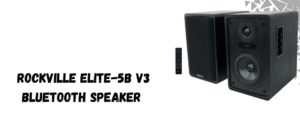
- Frequency response: 45 Hz–20 kHz, giving genuinely deeper low‑end reach than a typical party box in this comparison.
- 5.25″ woofer + silk dome tweeter in 0.5″ MDF rear‑ported cabinets; 800 W peak / 200 W RMS Class D amp with DSP.
- Rich I/O: Bluetooth 5.0, USB, card, optical, coax, RCA, plus 2 mic inputs with mic bass/treble/echo—suitable for hi‑fi listening and light karaoke in a fixed setup.
5 Core 10″ Karaoke Machine (ACTIVE HOME 10 2‑MIC)
The 5Core 10″ Bluetooth karaoke PA is a portable party speaker with an integrated 10″ woofer and super bullet tweeter, delivering about 40 W RMS / 400 W peak and a stated frequency range of 70 Hz–17 kHz, prioritizing vocal clarity and mid‑bass impact over deep sub‑bass extension. Its higher low‑end cutoff around 70 Hz means it will not reach as deep as the Rockville for music or movie content, but it will sound energetic and punchy for karaoke tracks, speech and pop in small rooms or outdoor gatherings. With Bluetooth, USB/TF, AUX, onboard EQ, mic echo, trolley handle, battery power, and two included wireless microphones, it functions as a self‑contained mobile PA specifically optimized for parties rather than neutral home listening.
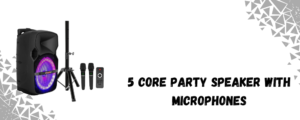
- Frequency range: 70 Hz–17 kHz, tuned for strong mids/vocals and party bass rather than hi‑fi low‑end extension.
- 10″ woofer + super bullet tweeter, ~40 W RMS / 400 W peak; rechargeable, trolley design, 2 wireless mics included.
- Best suited to karaoke, backyard or small indoor parties where portability and wireless mics matter more than flat frequency response.
Conclusion
Running several Bluetooth speakers from one device stops being a puzzle once you treat it like any other small rig: see what the source can send, see what the boxes can share, then add hardware only if the built‑in tricks run out. Start with Dual Audio or Audio Sharing when your phone offers it, fall back to each brand’s own party / TWS link when you’re in one ecosystem, and keep a cheap transmitter or splitter in mind for the stubborn mixes that refuse to pair nicely.
Here you can also find amazing drum thrones; alternatively, browse our page to find the best keyboard bench, audio mixers, drum mics, piano bench, keyboard stand, speakers, party speakers, and more.